

- Server-Side Rendering and React Server Components via React on Rails Pro with the Node Renderer
- Live at www.reactrails.com
Control Plane offers a viable, cost-saving alternative to Heroku, especially when using the cpflow gem to deploy to Control Plane.
ShakaCode recently migrated HiChee.com to Control Plane, resulting in a two-thirds reduction in server hosting costs!
See doc in ./.controlplane/readme.md for how to easily deploy this app to Control Plane.
The instructions leverage the cpflow CLI, with source code and many more tips on how to migrate from Heroku to Control Plane
in https://github.com/shakacode/heroku-to-control-plane.
React on Rails Pro provides Node server rendering and other performance enhancements for React on Rails.
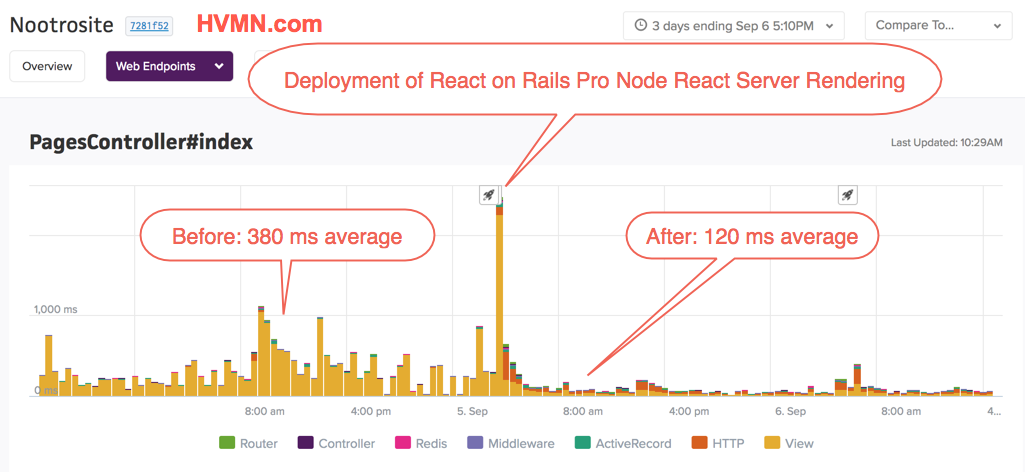
- HVMN Testimonial, Written by Paul Benigeri, October 12, 2018
- HVMN’s 90% Reduction in Server Response Time from React on Rails Pro
- Egghead React on Rails Pro Deployment Highlights
For more information, see the React on Rails Pro Docs.
- Optimizing your front-end setup with Rspack + Shakapacker for React on Rails, including SSR and code splitting.
- Upgrading your app to the current React on Rails 16.4 / Shakapacker 9.7 stack with modern asset builds.
- Better performance client and server side.
ShakaCode can also help you with your custom software development needs. We specialize in marketplace and e-commerce applications that utilize both Rails and React. We can even leverage our code for HiChee.com for your app!
See the ShakaCode Client Engagement Model article to learn how we can work together.
- forum.shakacode.com: Post your questions
- @railsonmaui on Twitter
- For a live, example of the code in this repo, see www.reactrails.com.
From Joel Hooks, Co-Founder, Chief Nerd at egghead.io, January 30, 2017:

For more testimonials, see Live Projects and Kudos.
- 2022-01-11: Added example of deployment to the ControlPlane.
You can see this tutorial live here: http://reactrails.com/
- Demoed Functionality
- Basic Demo Setup
- Javascript Development without Rails
- Rails Integration
- Rspack
- React Server Components (RSC)
- Thruster HTTP/2 Proxy
- Sass, CSS Modules, and Tailwind CSS integration
- Process Management during Development
- Contributors
- Open Code of Conduct
- Example of using React on Rails Pro with the Node Renderer for server-side rendering and React Server Components.
- Example of React Server Components with streaming, Suspense fallbacks, error boundaries, and client-driven re-fetching — see the
/server-componentspage. - Example of
'use client'directives splitting a tree between server-rendered and client-hydrated components (the "donut pattern"). - Example of using the react_on_rails gem (via React on Rails Pro) for React + Rspack integration with Rails.
- Example of React with CSS Modules inside Rails using modern Shakapacker/Rspack builds.
- Example of enabling hot reloading of both JS and CSS (modules) from your Rails app in development mode. Change your code. Save. Browser updates without a refresh!
- Example of React/Redux with Rails Action Cable.
- Example of Rails 8 with ReactJs/Redux/React-Router with Rspack and modern JavaScript.
- Enabling development of a JS client independently from Rails using the Rspack dev server. You can see this by starting the app and visiting http://localhost:4000
- Enabling the use of npm modules and Babel with a Rails application using Rspack.
- Easily enable retrofitting such a JS framework into an existing Rails app. You don't need a brand new single page app!
- Example setting up Ruby and JavaScript linting in a real project, with corresponding CI rake tasks.
- Enabling the i18n functionality with react-intl.
See package.json and Gemfile for versions
- React on Rails Pro with the Node Renderer for SSR and React Server Components
- React 19 with React Server Components support
- Redux
- react-router
- react-router-redux
- Rspack with hot-reload (for local dev)
- SWC transpiler for fast JavaScript/TypeScript compilation
- Ruby on Rails 8 for backend app and comparison with plain HTML
- Thruster - Zero-config HTTP/2 proxy for optimized asset delivery
- Heroku deployment guide
- Deployment to the ControlPlane
- Tailwind CSS
- Node
v22.3.0or above. Be sure that you have Node installed! We suggest using nvm and runningnvm listto check the active Node version. See this article Updating and using nvm. - Ruby 3.4.6 or above
- Postgres v9.2 or above
- Redis. Check that you have Redis installed by running
which redis-server. If missing and on MacOS, install with Homebrew (brew install redis) - Yarn.
git clone git@github.com:shakacode/react-webpack-rails-tutorial.gitcd react-webpack-rails-tutorialbundle installyarnrake db:setuprails start- Open a browser tab to http://localhost:3000 for the Rails app example
- Run all linters and tests:
rake - See all npm commands:
yarn run - To start all development processes:
foreman start -f Procfile.dev - To start only all Rails development processes:
foreman start -f Procfile.hot
Start the full development stack with foreman start -f Procfile.dev, then open http://localhost:4000 to iterate on the JavaScript client with hot reloading.
We're now using Rspack for all Sass and JavaScript assets so we can do CSS Modules within Rails!
- Production Deployment: heroku-deployment.md.
- Configure Buildpacks
heroku buildpacks:set heroku/ruby --app your-app
heroku buildpacks:add --index 1 heroku/nodejs --app your-app
heroku buildpacks:set --index 3 https://github.com/sreid/heroku-buildpack-sourceversion.git --app your-app
- Configure Buildpacks
-
See Yak Shaving Failing Integration Tests with React and Rails
-
Be sure to see Integration Test Notes for advice on running your integration tests.
-
Testing Mode: When running tests, it is useful to run
foreman start -f Procfile.specin order to have Rspack automatically recompile the static bundles. Rspec is configured to automatically check whether or not this process is running. If it is not, it will automatically rebuild the bundle to ensure you are not running tests on stale client code. This is achieved via theReactOnRails::TestHelper.configure_rspec_to_compile_assets(config)line in therails_helper.rbfile. If you are using this project as an example and are not using RSpec, you may want to implement similar logic in your own project.
This project is standardized on Rspack with Shakapacker.
Bundler selection is fixed in config/shakapacker.yml:
assets_bundler: rspackreact_on_rails_progem:16.6.0react-on-rails-pronpm package:16.6.0react-on-rails-pro-node-renderernpm package:16.6.0shakapackergem/npm package:10.0.0@rspack/coreand@rspack/cli:2.0.0-beta.7react:~19.0.4(minimum for React Server Components)
- Faster dev/test/prod compile times
- Better incremental rebuild performance for local development
- One bundler path for browser bundles and SSR bundles
Currently on webpack, temporarily. The repo is built on webpack instead of rspack while shakacode/react_on_rails_rsc#29 ships rspack support for the RSC plugin. Tracked as a
TODOinconfig/shakapacker.yml; flips back once that lands.
All bundler configuration is in config/webpack/:
webpackConfig.js— Composer; produces all bundles (client + SSR + RSC)commonWebpackConfig.js— Shared base configurationclientWebpackConfig.js— Client bundle (browser, with HMR + RSC client-references)serverWebpackConfig.js— SSR bundle (runs in the Pro Node Renderer)rscWebpackConfig.js— React Server Components bundle (runs in the Pro Node Renderer with thereact-serverresolve condition)bundlerUtils.js— Bundler detection helper (webpack vs rspack)development.js,production.js,test.js— Environment-specific tweaks
This project demonstrates React Server Components running on top of the React on Rails Pro Node Renderer. With the dev stack running, visit /server-components to see the demo.
| Section | What it demonstrates |
|---|---|
| Server Environment | A server-only component reads Node's os module and lodash; neither library reaches the browser. |
| Interactive Client Component | A 'use client' component nested inside a server-component tree, hydrated normally — the "donut pattern". |
| Live Server Activity | Client-driven server-component re-fetching via useRSC().refetchComponent + RSCRoute, with react-error-boundary catching simulated errors and a Retry button. |
| Streamed Comments | An async server component receives comments as props from the controller and streams in via <Suspense> after the page shell. |
The app produces three bundles, all sharing the client/app/packs/server-bundle.js entry:
- Client bundle — Browser JavaScript with HMR; emits
react-client-manifest.jsonfor client-component resolution. - SSR bundle — Traditional server-side rendering; runs in the Pro Node Renderer (port 3800).
- RSC bundle — RSC payload generation; runs in the Pro Node Renderer with the
react-serverresolve condition and an extra loader that classifies'use client'modules as client references.
The three bundles are gated by env vars:
| Env var | Result |
|---|---|
(default for bin/shakapacker-dev-server) |
Client bundle only |
SERVER_BUNDLE_ONLY=yes |
SSR bundle only |
RSC_BUNDLE_ONLY=yes |
RSC bundle only |
(none, default for bin/shakapacker) |
All three |
Procfile.dev runs three watchers (wp-client, wp-server, wp-rsc), each gated by its own env var, alongside the Rails server and the Pro Node Renderer.
In addition to the Basic Demo Setup prerequisites:
- A
REACT_ON_RAILS_PRO_LICENSEenvironment variable. Development and test environments don't require one (the Pro engine logs an info-level notice instead). Production deploys must set it to a JWT from pro.reactonrails.com. RENDERER_PASSWORD(shared between Rails and the Node Renderer for SSR auth). The dev/test default is provided in.env.example; production must override.- Optional:
RSC_SUSPENSE_DEMO_DELAY=trueadds a small artificial server delay so Suspense fallbacks are visible during the demo. Off by default; enabled on the QA review-app.
- How React Server Components work — RoR Pro's RSC overview
- Preparing your app for RSC —
'use client'directive rules - Component patterns — async server components and Suspense
- Data fetching — controller-props pattern (used by
CommentsFeed)
This project uses Thruster, a zero-config HTTP/2 proxy from Basecamp, for optimized asset delivery and improved performance.
- HTTP/2 Support: Automatic HTTP/2 with multiplexing for faster parallel asset loading
- Asset Caching: Intelligent caching of static assets from the
public/directory - Compression: Automatic gzip/Brotli compression for reduced bandwidth usage
- Simplified Configuration: No need for manual early hints configuration
- Production Ready: Built-in TLS termination with Let's Encrypt support
Compared to running Puma directly with --early-hints:
- 20-30% faster initial page loads due to HTTP/2 multiplexing
- 40-60% reduction in transfer size with Brotli compression
- Simpler setup - zero configuration required
- Better caching - automatic static asset optimization
Thruster is already integrated into all Procfiles:
# Development with HMR
foreman start -f Procfile.dev

# Production
web: bundle exec thrust bin/rails server
The server automatically benefits from HTTP/2, caching, and compression without any additional configuration.
For detailed information, troubleshooting, and advanced configuration options, see docs/thruster.md.
This example project uses mainly Tailwind CSS for styling. Besides this, it also demonstrates Sass and CSS modules, particularly for some CSS transitions.
We're using Rspack to handle Sass assets so that we can use CSS modules. The best way to understand how we're handling assets is to closely follow this example. We'll be working on more docs soon. If you'd like to give us a hand, that's a great way to learn about this!
For example in client/app/bundles/comments/components/CommentBox/CommentBox.jsx, see how we use standard JavaScript import syntax to refer to class names that come from CSS modules:
import css from './CommentBox.module.scss';

export default class CommentBox extends React.Component {
  render() {
    const { actions, data } = this.props;
    const cssTransitionGroupClassNames = {
      enter: css.elementEnter,
      enterActive: css.elementEnterActive,
      exit: css.elementLeave,
      exitActive: css.elementLeaveActive,
    };
  }
}The tutorial makes use of a custom font OpenSans-Light. We're doing this to show how to add assets for the CSS processing. The font files are located under client/app/assets/fonts and are loaded by both the Rails asset pipeline and the Rspack HMR server.
bundle exec foreman start -f <Procfile>Procfile.dev: Starts the full development stack with Hot Reloading. Six processes:rescript— ReScript watch moderails— Rails server via Thruster on port 3000wp-client— Shakapacker dev server with HMR (client bundle)wp-server— Shakapacker watcher for the SSR bundlewp-rsc— Shakapacker watcher for the React Server Components bundlenode-renderer— React on Rails Pro Node Renderer on port 3800
Procfile.dev-static: Starts the Rails server and generates static assets that are used for tests.
The Shaka Code team!, led by Justin Gordon, along with with many others. See contributors.md
Special thanks to JetBrains for their great tools: RubyMine and WebStorm. Some developers of this project use RubyMine at the top level, mostly for Ruby work, and we use WebStorm opened up to the client directory to focus on JSX and Sass files.
We're looking for great developers that want to work with Rails + React (and react-native!) with a remote-first, distributed, worldwide team, for our own products, client work, and open source. More info here.
Thank you from Justin Gordon and ShakaCode
Thank you for considering using React on Rails.
Aloha and best wishes from the ShakaCode team!